
thinkphp 3.2 使用 PHPQRCODE 生成二维码 找不到 QRcode 问题

按网上的教程一直出现找不到 QRcode 问题, 按下面的结构和代码写就可以了
public function qrcode($url='https://blog.liuguofeng.com/',$level=3,$size=4){
  Vendor('phpqrcode.phpqrcode');
  $errorCorrectionLevel =intval($level) ;//容错级别
  $matrixPointSize = intval($size);//生成图片大小
  //生成二维码图片
  //echo $_SERVER['REQUEST_URI'];
  $object = new \QRcode();
  $object->png($url, false, $errorCorrectionLevel, $matrixPointSize, 2);
}
Continue reading thinkphp 3.2 使用 PHPQRCODE 生成二维码 找不到 QRcode 问题
ThinkPHP 中无法通过I方法获取json数据的解决方法
使用以下方法获取:
$put=file_get_contents('php://input');
$put=json_decode($put,1);
foreach ($put as $key => $value) {}
MySQL 数据表中查找某字段下重复记录

select title ,count(*) as count from ocenter_news group by title having count>1;
Error when executing PhantomJs procedure – proc_open() has been disabled for security reasons 错误解决
PHP 使用 Phantomjs 需开启 proc_open, 本文中使用 PHP 7, ThinkPHP 5, Phantomjs 2.1.1

从错误代码中可以看到是 proc_open 被禁用了。 Continue reading Error when executing PhantomJs procedure – proc_open() has been disabled for security reasons 错误解决
ThinkPHP 5 Linux 服务器 Nginx 下无法匹配路由模式 404错误
location ~ .+\.php($|/) {
    fastcgi_pass    unix:/run/php/php7.0-fpm.sock;
    fastcgi_split_path_info ^((?U).+.php)(/?.+)$;
    fastcgi_param PATH_INFO $fastcgi_path_info;
    fastcgi_param PATH_TRANSLATED $document_root$fastcgi_path_info;
    fastcgi_param    SCRIPT_FILENAME    $root$fastcgi_script_name;
    include        fastcgi_params;
}
ThinkPHP 5 LNMP PHP 7 环境 服务器 Error 500 错误

ThinkPHP 5 部署在了LAMP/LNMP 环境上很有可能出现 Error 500 的情况,这个时候需要开启 php 错误提示来判断是否是因为设置了open_basedir 选项出错。 Continue reading ThinkPHP 5 LNMP PHP 7 环境 服务器 Error 500 错误
CentOS 安装 PhantomJS 2.1.1 64/32
# 安装依赖软件
yum -y install wget fontconfig

# 下载PhantomJS 64位/32位
wget -P /tmp/ https://bitbucket.org/ariya/phantomjs/downloads/phantomjs-2.1.1-linux-x86_64.tar.bz2
wget -P /tmp/ https://bitbucket.org/ariya/phantomjs/downloads/phantomjs-2.1.1-linux-i686.tar.bz2

# 解压 64位/32位
tar xjf /tmp/phantomjs-2.1.1-linux-x86_64.tar.bz2 -C /usr/local/
tar xjf /tmp/phantomjs-2.1.1-linux-i686.tar.bz2 -C /usr/local/

# 重命名 64位/32位
mv /usr/local/phantomjs-2.1.1-linux-x86_64 /usr/local/phantomjs
mv /usr/local/phantomjs-2.1.1-linux-i686 /usr/local/phantomjs

# 建立软链接
ln -s /usr/local/phantomjs/bin/phantomjs /usr/bin/
在终端执行phantomjs命令,如果跟我下图的结果一样就表示安装成功了。

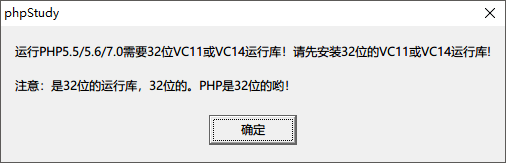
phpStudy 切换 PHP7 提示 需要 32 位 VC11 或 VC14 运行库
Nginx 去掉 ThinkPHP Url 中的 index.php
index  index.html index.php index.htm;
location / {
    #去掉index.php,index 必须在此之上。
    if (!-e $request_filename) {
        rewrite ^/(.*)$ /index.php?s=$1 last;
        break;
    }
}